AI-Powered Inventory System — How Nova Tracks Every Component in My Smart Home
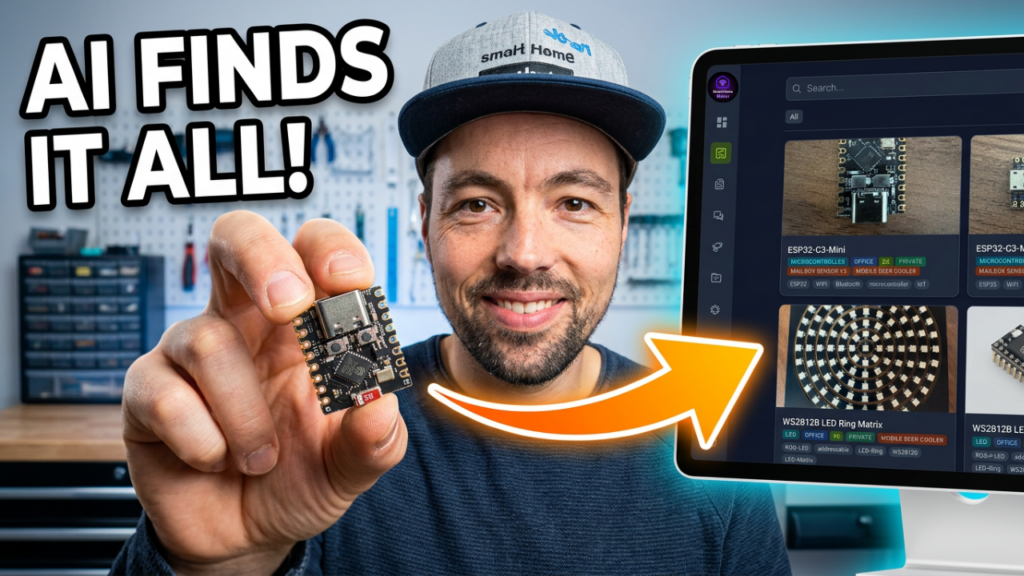
If you’re anything like me, you’ve got drawers full of resistors, ESP32 boards, sensors, and connectors — and you never know what you actually have. My AI assistant Nova now manages my entire electronics inventory. Snap a photo, and it identifies the component. Ask via Telegram, and it tells you instantly if you have it in stock.

The Problem
Every maker knows this: you order components for a project, use half of them, and toss the rest into a drawer. Three weeks later, you order the exact same parts because you forgot you already had them. Or worse — you start a build on a Saturday afternoon only to realize you’re missing one critical resistor.
I wanted a system that lets me search my inventory by voice, automatically adds new purchases, and identifies unknown components from a photo. No spreadsheets. No manual data entry.
3 Ways to Add Components
Nova’s inventory system accepts components from three different sources — each optimized for a different situation.
1. Photo Form — AI Vision Recognition
This is the magic one. I take a photo of a component — a chip, a sensor module, a bag of resistors — and upload it via a simple web form. GPT-4o Vision analyzes the image and reads:
- Chip markings and part numbers
- Component values (resistance, capacitance)
- Package type and pin count
- Manufacturer identification
The AI doesn’t just OCR the text — it understands what it’s looking at. A photo of a blue potentiometer correctly returns the type, resistance range, and even identifies it as a A3144 hall sensor. A bag of SMD resistors gets identified by their marking codes.
2. Amazon Email Parsing
When I order components from Amazon, the shipping and delivery confirmation emails are automatically processed. An LLM extracts:
- Product name and description
- Quantity ordered
- Order number and delivery date
- Estimated category (sensor, microcontroller, passive component, etc.)
The order status is tracked automatically: In Transit → Delivered → In Stock. When a package arrives, I get a Telegram notification asking me to confirm and assign it to a storage bin.
3. Telegram / Voice
I can simply tell Nova: “Add 10 ESP32-S3 DevKits to bin B3” — and it creates the entry. Voice messages work too, thanks to Whisper transcription in the background.
The Workflow
Regardless of the input source, every component goes through the same pipeline:
- AI Recognition — GPT-4o Vision identifies the component from the photo, or the LLM extracts details from Amazon emails
- Telegram Approval — Nova sends me a preview with the identified component, quantity, and suggested category. I confirm or correct with one tap
- Project Assignment — Each component gets assigned to a project (e.g., “Smart Home Remote Control v2”) and a physical storage bin
- Inventory Entry — The component is saved with photos, specs, project reference, and storage location
- Status Tracking — For Amazon orders: delivery status is tracked until the part is physically in stock
The entire pipeline is built in n8n with Code nodes for the processing logic and OpenAI nodes for the AI recognition.
How I Use It Daily
Searchable Dashboard
A dedicated page shows all inventory items with photos, quantities, and filters. I can search by component name, project, category, or storage bin. Each entry shows the original photo — so even unlabeled components are identifiable at a glance.
Voice Search via Telegram
“Do I have any ESP32s left?” — Nova searches the inventory and responds with quantity, location, and which project they’re assigned to. No app to open, no spreadsheet to scroll through.
Project Management
When I plan a new build, I can check which components I already have and what I need to order. Nova knows which parts belong to which project, so I can see at a glance if a project has all its materials.
QR Code Label Printing
Each storage bin gets a QR code label. Scanning it shows the bin’s contents instantly. When I reorganize storage, I just update the bin assignment — the QR code stays the same.
Tech Stack
- n8n — Workflow orchestration (photo processing, email parsing, Telegram interface)
- GPT-4o Vision — Component identification from photos
- GPT-4o — Amazon email extraction and natural language queries
- Telegram Bot — Primary interface for queries and approvals
- Home Assistant — Dashboard integration
- Whisper — Voice message transcription
What’s Next
The system already saves me time and money — no more duplicate orders, no more rummaging through unmarked bags. Next up: automatic reorder suggestions when stock drops below a threshold.
If you’re a maker who’s drowning in components, this kind of system is absolutely worth building. The AI recognition alone pays for itself after the first avoided duplicate order.
More information can be found in my detailed AI architecture breakdown.
Leave a Reply