Quick updates, thoughts and discoveries from the smart home world.
The hard part about keeping an inventory is not looking things up. It is the typing. Every new component means a name, specs, a category, a photo — and that is exactly where most people quit.
So I handed that step to an AI. I take a photo of the new part, and it reads what it is, pulls the details out of the order confirmation email, and writes the entry for me.
The inventory only works because keeping it up to date stopped being work.
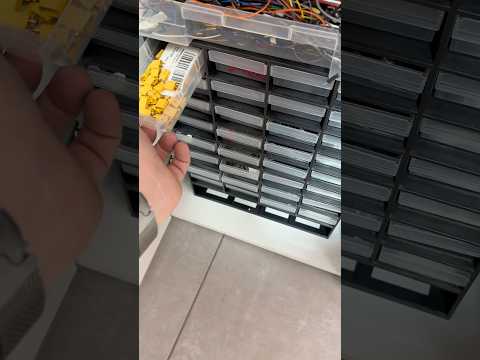
Anyone who builds things ends up with the same problem: dozens of boxes of components, and no idea what is actually in them. You end up buying a part you already own twice.
So I gave my workshop a proper inventory. Every part has a name, a photo, a quantity and a place it belongs — and I can look it up in seconds instead of digging through drawers.
Not glamorous, but it turned my parts pile back into something I can actually use.
Coffee has a short window where it actually tastes the way it should. Miss it and you are drinking something lukewarm you no longer enjoy.
So my smart mug talks to my home setup: I set the temperature I want, and I get a notification the moment the cup is there. No guessing, no first sip that turns out to be too hot.
It is a small thing. It is also the kind of small thing you notice every single morning.
Zigbee, Z-Wave, Matter, KNX, plain WiFi — and then the question of which platform should run it all. It is the first decision people have to make, and it is the one they have the least information for.
So I built a free advisor that walks you through it. You answer a few questions about your budget, how much tinkering you actually enjoy, and what you want out of it, and it gives you a recommendation instead of a wall of comparison tables.
No account, no cost. It just tries to save you the weeks of reading I went through.
Stop guessing, start building! Trying to pick the right ecosystem for your home? I’ve built a brand-new Smart Home Advisor to help you navigate the chaos.
My blog about smart home tinkering had been wearing the same skin for a long time, so I finally sat down and reworked the whole visual side of it.
The clip puts the old version next to the new one. Same content, very different feeling when you land on the page.
I am curious whether the new layout actually reads better, so I would rather hear honest reactions than compliments.
Not everyone who lives in a smart home wants to dig through settings menus. My goal here was that someone without any technical background can still use the thing.
In the clip I walk through what changed and why that lowers the barrier for everyday users.
It is a small step, but those are usually the ones that decide whether a system gets used or ignored.
A cup that talks to my phone over Bluetooth sounds a bit silly until you have had lukewarm coffee for the third time in one morning.
I hooked it into Home Assistant, the open source software that runs my house, so the current temperature shows up next to all my other sensors.
From there I can check on it from anywhere and store presets for the drinking temperature I actually like.
People often ask me which system they should pick, as if there were a single correct answer waiting somewhere.
In this short clip I explain why the better question is what your own home and your own habits actually need.
The setup that fits your daily routine beats the one that looks impressive in a comparison table.
My old FritzBox router did its job for years, but I wanted more control over what happens inside my network. So I moved everything over to UniFi gear.
The big win is segmentation: I can split the network into separate zones, so smart home gadgets no longer sit on the same lane as my laptops.
Between those zones I set firewall rules that decide which device is allowed to talk to which. That alone made the whole setup noticeably safer.
A new robot vacuum moved in. Choosing one turned out to be harder than expected because the market is flooded with models that all promise the same things.
A fellow creator helped me narrow it down, which saved me a lot of comparison spreadsheets.
We landed on the Roborock Qrevo Curv 2 Pro and so far nobody in the house has complained.
For days I had been fighting to get my SwitchBot Lock Pro talking to Home Assistant over Bluetooth, and I documented every dead end along the way.
Then the solution turned out to be sitting right in front of me the whole time. Matter, a shared standard that lets devices from different brands work together, made the detour unnecessary.
Sometimes you stare at a problem so long that you stop seeing the easy path next to it.
Not every project ends with a clean solution. This one has me stuck at the point where the device should show up in Home Assistant and simply does not.
In the clip I lay out what I tried so far and where exactly the chain breaks.
If someone out there has already solved this, I am genuinely interested in hearing how.
USB cables all look the same and behave completely differently. I have wasted more time than I want to admit on a cable that only carried power.
A small tester now tells me within seconds what a cable can actually do, so the bad ones go straight into the bin.
The tip for this one came from another maker, and it has already earned its place in my drawer.
Before any smart lock can go on my home office door, the door itself has to cooperate. Right now it still has an old warded lock, the simple kind with a skeleton style key.
That type of lock barely works with modern hardware, so I am replacing it with a cylinder lock first.
This clip is the unglamorous groundwork. The interesting part only becomes possible once the mechanics are right.
After days of trying to save my home server, I finally stopped. It ran on Proxmox, a system that hosts several small virtual machines on one box, and it kept crashing.
Before it went for good I pulled off the configs that were not backed up anywhere else, including my camera setup and a pile of automation workflows. Keep your backups separate from the machine, that lesson stuck.
I ruled out the drive, swapped the memory, adjusted power settings in the firmware. It survives heavy load and dies the moment things go quiet, which points at worn out power regulation on the mainboard.
The reassuring part: the software that runs my house was never on that machine.
My home server gave up, and with it the machine that hosts a good part of my setup.
I do have backups, just not of every single configuration file that grew over the months. So the rescue attempt is really about not rebuilding all of that from memory.
This clip catches me right in the middle of that operation, before I knew how it would end.