How I taught my garage camera to remember bin day
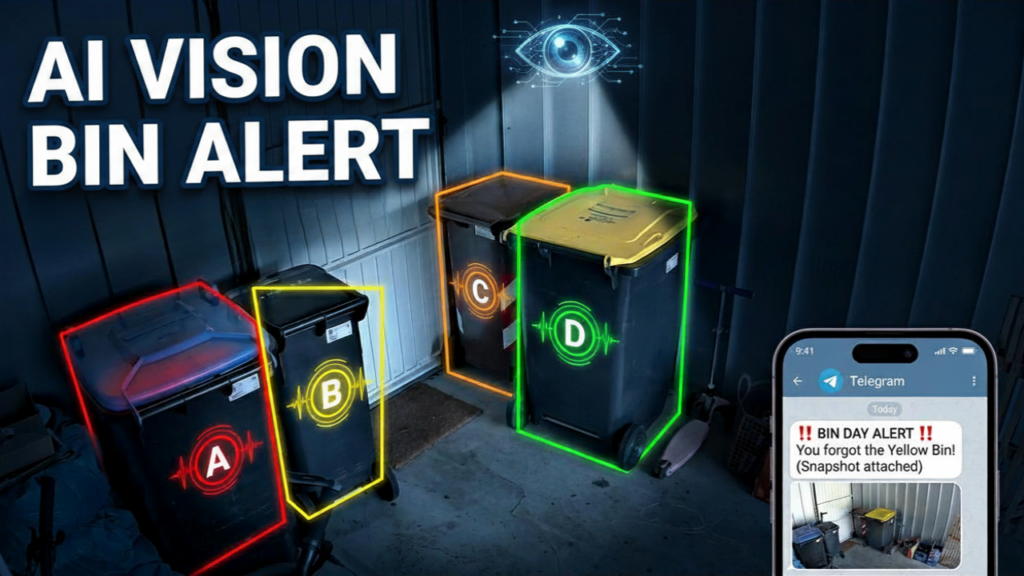
Update, September 2026. I rebuilt this twice since publishing. The calibrated bounding boxes in Step 2 are no longer what runs in my garage — they failed in a way I did not see coming, and so did their replacement. I have left the original write-up intact below, because the two dead ends turned out to be the useful part. If you are here to copy something that works, read what broke and what runs now first.
The problem
Bin day always sneaked up on me. Miss the pickup of any of the four bins and you’re stuck with overflowing waste for another two weeks — bio, packaging, paper, residual, all equally annoying when they pile up. I tried calendar reminders, smart speaker nudges, a sticky note on the kitchen counter. None of it stuck.
What I needed wasn’t another reminder. I needed a system that knew whether the bin was already out and only nagged me when it wasn’t.
The setup at a glance
- Reolink garage cam — already there, 24/7 RTSP, sees the four bins lined up against the wall
- GPT-4o vision — gets a snapshot every evening before pickup, returns which bins are visible inside
- Waste collection schedule integration for Home Assistant — knows tomorrow’s pickup type
- n8n — orchestrates the snapshot → vision → calendar → notification chain
- Telegram bot — sends the actual photo so I can verify with my own eyes
Step 1: the snapshot
The garage cam already exposes an RTSP feed. Home Assistant has it as camera.garage. The first step is just grabbing a still frame:
// In n8n Code node
const ha_token = fs.readFileSync('/path/to/ha_token','utf8').trim();
const snapshot = await fetch('http://homeassistant:8123/api/camera_proxy/camera.garage', {
  headers: { 'Authorization': 'Bearer ' + ha_token }
});
const buffer = Buffer.from(await snapshot.arrayBuffer());
const b64 = buffer.toString('base64');
Step 2: telling the AI where to look (this is the part I later tore out)
My first version was naive: I sent the full garage snapshot to GPT-4o and asked “which of the four bins do you see?”. It worked maybe 70% of the time. The model confused the recycling bin with a storage crate, hallucinated bins that weren’t there, missed the bio bin behind a bike. Unusable for an alert that has to be trustworthy.
The fix: manually calibrated bounding boxes. The bins always live in the same four spots against the back wall. I measured those spots once on a reference frame (640×480) and hardcoded them as sectors:
const SECTORS = {
  A: { x:10,  y:165, w:140, h:235, label: "Paper",          color: "blue"   },
  B: { x:145, y:170, w:95,  h:210, label: "Residual waste", color: "black"  },
  C: { x:240, y:110, w:80,  h:215, label: "Bio",            color: "brown"  },
  D: { x:315, y:120, w:110, h:250, label: "Recyclable",     color: "yellow" },
};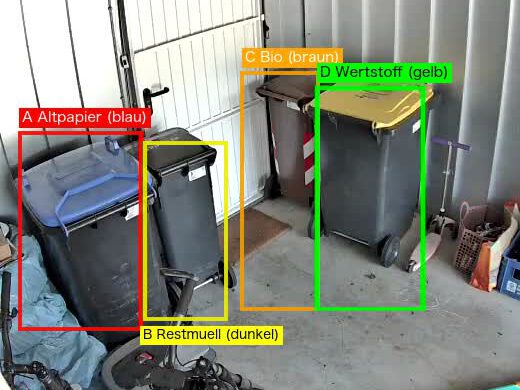
Calibration is a one-time job: take a snapshot when all four bins are in position, measure each sector in any image editor, paste the coordinates. At the time I wrote that this five-minute job doubled my accuracy. That held for about six weeks — see below for the day it stopped holding.
The workflow then scales each new snapshot to 640×480 (so the sectors stay valid even if the camera resolution changes) and crops one image per sector with ffmpeg piped in/out of memory — no temp files:
function ffmpeg(inputBuf, vfArg) {
  return new Promise((resolve, reject) => {
    const ff = spawn("ffmpeg", ["-loglevel","error","-i","pipe:0","-vf",vfArg,"-f","mjpeg","-q:v","5","pipe:1"]);
    const chunks = [];
    ff.stdout.on("data", c => chunks.push(c));
    ff.on("close", code => code === 0 ? resolve(Buffer.concat(chunks)) : reject(code));
    ff.stdin.end(inputBuf);
  });
}

const baseBuf = await ffmpeg(snapshotBuffer, "scale=640:480");
const cropBuf = await ffmpeg(baseBuf, `crop=${spec.w}:${spec.h}:${spec.x}:${spec.y}`);
Each cropped image is now a tightly framed picture of exactly one slot. The GPT-4o call is correspondingly simple — instead of “find four bins in this scene”, it answers one binary question: is a bin sitting in this slot, yes or no?
const prompt = `You see a tightly cropped image of a small area in a garage.

First describe in 1-2 sentences what you ACTUALLY see (floor? wall? door? plastic bin? bicycle?). Invent NOTHING.

Then decide:
- bin_visible = TRUE only if you CLEARLY see a wheelie bin body (rectangular plastic container with wheels at the bottom and a distinct lid on top) taking up MORE than half the image
- bin_visible = FALSE if the image shows mostly door, wall, floor, shadow, bike, or other objects
- bin_visible = FALSE when in doubt

Respond as JSON only:
{"what_i_see": "concrete observation in 5-10 words", "bin_visible": true/false}`;
The four sector calls run in parallel — about 2 seconds end-to-end. The mapping back to bin types is trivial because each sector already has its label attached.
Three small choices that mattered:
- Force a “what_i_see” field before the boolean. Asking the model to describe what’s actually in the crop before deciding bin_visible suppresses hallucinations — it has to commit to “I see a door” before it can claim “bin visible: true”
- Explicit bias toward FALSE on uncertainty. A missed alert (false negative) is fine — I’ll see the bin still in the garage on my next walk-by. A wrong “bin is outside” message would erode my trust in the whole system
- temperature: 0 + max_tokens: 150. Stable, parseable, cheap — about 0.5 cents per evening check across all four sectors
Step 3: the calendar cross-check
Home Assistant pulls in the local pickup schedule via the Waste Collection Schedule integration. The relevant sensors look like this:
sensor.next_bio_pickup         // "in 1 day"
sensor.next_residual_pickup    // "in 10 days"
sensor.next_paper_pickup       // "in 5 days"
sensor.next_recyclable_pickup  // "in 3 days"
The workflow runs every evening at 20:45 and checks whether any of these sensors say “in 1 day”. If yes, that bin needs to be outside before morning.
Step 4: the photo notification
If the relevant bin is still listed in bins_visible from the vision call, Telegram fires off the alert with the actual snapshot attached:
🟤 Bin check: Bio bin (tomorrow)

⚠️ The bio bin is still in the garage!
Please take it out NOW.

📷 All four bins are still in the garage, including the bio
bin scheduled for tomorrow's pickup.
The photo is what makes this work. A text-only alert is easy to dismiss with “I’m sure I took it out”. A photo of the bin literally still sitting there is not.
What broke — twice
The sectors worked beautifully until someone put the bio bin back in the wrong spot. Which, in a garage shared with a family, is not an edge case. It is a Tuesday.
Here is the flaw, and it is a design flaw, not a tuning problem: a sector encodes a position, and I was using it to mean an identity. Sector D was “the recyclable bin” only because the recyclable bin usually stood there. The moment the bio bin stood there instead, the system reported that the recyclable bin was still in the garage — while it was already out on the street. A confident alert about a bin that was not there.
The second flaw I had actually written into the original post as a strength: I claimed the per-sector check worked at night because the model only had to spot a bin-shaped object. What I had overlooked is that my sector definitions also carry a color field — and after dark the camera switches to infrared and returns greyscale. There is no yellow in a greyscale frame. Half of my identification logic was quietly inert every single evening, which is exactly when the check runs.
Rebuild one: stop locating, start counting
So I threw the sectors away and asked a question that does not depend on where anything stands. Four bins live in that garage. If the collection is due tomorrow and I can still count four, nothing has been put out. If I count fewer, the due one is already on the street.
This gives up information on purpose — it no longer knows which bin is missing. It does not need to. The waste calendar already knows what is due; the camera only has to answer whether anything left the garage.
// Four bins permanently live in the garage: paper, residual, bio, recyclable.
const BASELINE = 4;

// fewer than baseline  -> the due bin is already outside  -> stay quiet
// equal to baseline    -> nothing was put out            -> send the alert
// unparseable answer   -> skip, never guess
That last line matters more than the other two. A vision model will occasionally return something you cannot parse. The tempting default is to treat that as “no bins seen” and alert. Do not. A false alarm costs trust that a missed reminder does not — I would rather roll a bin out myself once than be nagged about a bin that is already on the kerb.
Rebuild two: when the failure points the wrong way
In September the bins got rearranged again, this time into two tight pairs. In the infrared frame, a tight pair of dark bins is one dark blob. Asking “count each bin” returned 3 instead of 4, reproducibly, on a frame where I could see all four myself.
Now look at which way that error points. Three is fewer than the baseline of four, and fewer means “the due bin is already outside” — so the system stays silent. The miscount did not produce a wrong alert. It produced no alert at all, on collection day, with the bin still in the garage, and nothing anywhere in the logs marking it as a problem. An error that shouts is a nuisance. An error that goes quiet is the dangerous one, and this system had been quietly wrong for an unknown number of evenings.
The fix was not a better model. It was forcing the model to look twice, by splitting the frame into halves and asking for each half separately:
You are looking at the inside of a garage (night shot, greyscale/IR).
Count the WHEELIE BINS.
Do NOT count: bicycles, scooters, boxes, brooms, hoses, shelves, tools,
shadows, pipes.
Work through the image in two halves: LEFT half and RIGHT half.
List the bins you find in each half individually. Bins stand close
together and partly occlude each other.
Answer ONLY as JSON: {"left":["..."],"right":["..."],"count":<sum>}
Same model, same image, same temperature. On the frame that had been failing, the old prompt got it right in 0 of 2 runs; the split-halves prompt got it right in 5 of 5. Listing the bins per half before giving a total is doing the work twice on purpose — the model cannot collapse a pair into a blob if it has to name the members of each half out loud.
(The prompt above is translated; the one actually running is in German, because the rest of the house speaks German. The structure is what matters.)
What I would tell my June self
Ask what your assumption is made of. “The recyclable bin is in sector D” looks like a fact about bins. It is a fact about furniture arrangement, and furniture moves. Anything a person can nudge with their hip is not a key.
And ask which way your errors point. I spent the first version chasing accuracy as a single number. The number that mattered was never 70% or 95% — it was whether a wrong answer would make the system shout or go silent. Both rebuilds came from that question, and the second one found a fault that had cost me nothing yet and would have, eventually, on a Tuesday morning.
What I learned
A smaller question beats a bigger model. This is the one lesson that survived both rebuilds. Every version that worked, worked because I narrowed what the model had to decide in one go — a sector instead of a scene, then half an image instead of a whole one. Not once did I fix an accuracy problem by reaching for a better model.
Run it the evening before, not the morning of. My first version ran at 06:00 on pickup day. Useless — by then I was already drinking coffee and the truck was halfway down the street. The evening check gives me time to deal with it during normal household hours.
Snapshot proof beats text proof, every time. Once the alert includes a photo of the bin still in the garage, there is no debate. I get up and roll it out.
Results
Three months in, zero missed pickups — but not with the system described above. It took two rebuilds to get there, and the second one only happened because I went looking for a failure that had not cost me anything yet.



Leave a Reply