What my smart home got done while I was away
It has been quiet here for three months. First a holiday, then other things got in the way. My smart home kept working during that time. That is exactly what I built it for – and from my holiday I could watch it work through its list.
The house works while I am away
Every idea, every wish and every bug I notice now lands in a task system of my own. Either I type it into a web interface, or I press the Action Button on my iPhone and simply speak it. The recording stays on the device at first and moves into the system automatically once I am back on Wi-Fi.
The work happens in the background, without me starting each task by hand. It is spread across more than twenty specialised agents by now. One handles firmware, one Home Assistant, one my web interfaces – plus dedicated ones for CAD design, PCB layout, research, security and quite a few more. They run on local open-source models and keep their own memory of what applies in my setup, so they get a little better with every task.
Claude Code orchestrates all of it, for one simple reason: for distributing the work and especially for the final review, the local models are not strong enough yet. If a result does not hold up, it gets rejected, the feedback goes straight into the agent’s memory and back onto the task – and nothing gets shipped. Only if doubt remains does it reach me.
I could follow the result from my holiday: the burn-down chart in my own dashboard went down day after day. By the end the backlog was noticeably smaller. It is growing again now, because I keep adding things – but that is a good problem to have.
Inventory: orders file themselves
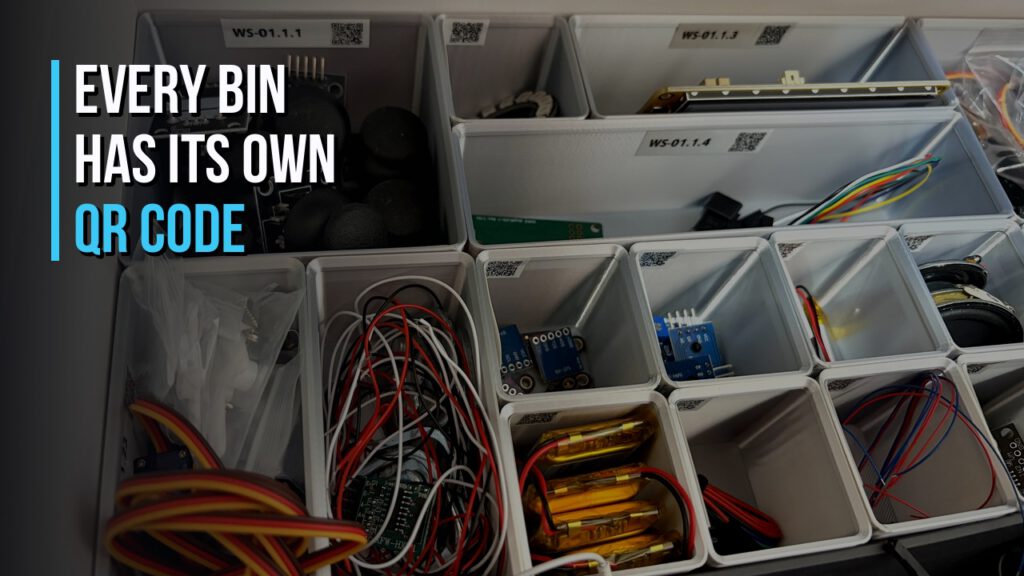
There are thousands of small parts in my workshop. Everything recorded gets a storage location, and that location is hierarchical: a cabinet, a drawer inside it, and the individual bin within that drawer. Every compartment carries a QR code. Scanning it shows me what should be in there, and lets me add something new in two steps.
The part that saves me the most work: orders file themselves now. Confirmation emails from the shops I use get parsed, and the item is created with quantity and, where possible, an image – marked as in transit at first. Only the delivery confirmation makes it count as available. That distinction matters more than it sounds: when the AI later checks whether I already own the parts for a project, a component sitting in a depot is no help at all.
One small thing I deliberately changed. The question of which compartment a part belongs in used to arrive right after delivery. I could almost never answer it – the parcel was still on the porch. Now that question comes once a week, bundled, for everything still without a place. Immediately would be technically correct. In practice, immediately means it never gets answered.
The real benefit shows up when planning. If I create an idea that needs hardware, I get told straight away what is in the house and what is missing. Whatever is missing goes on the shopping list so it travels with the next order.
Gridfinity – and a printer that barely stops
In parallel I am converting my drawers to Gridfinity. It is an open grid system: you fill a drawer with grid baseplates and drop matching containers on top, combined however you like. There are ready-made printable models for just about anything.
One example: until recently my two lavalier microphones lived in their original packaging inside a drawer, purely because the supplied foam held them neatly. There was a Gridfinity model for exactly that. Now the microphones and the USB adapter sit side by side, and the box is gone.
The catch: this means a lot of print time. My printer now runs almost continuously, except when I am recording.
A print progress that follows me everywhere
With that much printing, I wanted to see the status without unlocking my phone. Home Assistant can trigger Live Activities now – so the progress percentage sits right on the lock screen and keeps updating.
I used to send myself separate notifications at 25, 50 and 75 percent. I do not need those any more. I can see where a print stands at any moment and queue the next job in time.
Two things did surprise me. First, the same display runs on the Apple Watch, with a short haptic tap on changes – I do not even take the phone out. Second: I got into the car while a print was running, and the status appeared in CarPlay. I had not expected that.
I showed how to set this up in a separate tutorial: Put any percentage in your house on your iPhone lock screen.
55 does not fit 38: the camera adapter
Finally I went back to the cameras in the garden. My Biohort garden shed has a band of glass running around the top. For a long time simple indoor cameras stood behind that glass, looking out in two directions. Protected, cheap, arguably clever.
It just does not work reliably. With the sun at a low angle, the glass reflects so badly that the image shows almost nothing. Sometimes it fogs up, sometimes it gets dirty from outside. And at night the infrared illumination threw its own reflections onto the pane – precisely when a camera matters most.
So I moved to proper outdoor cameras, mounted on the outside. That is when I found that the mounting plate supplied with the Reolink camera does not line up with the existing screw points: the rounded corner pieces of the shed are fixed with two screws roughly 55 millimetres apart, while the camera plate wants 38.
Drilling fresh holes into a garden shed was not an option for me. So I designed an adapter in FreeCAD: 55 millimetres on top to reuse the existing screws, 38 underneath for the camera, reinforced with heat-set threaded inserts so nothing cracks under the screws. Printed in black, because the camera is black and the shed is anthracite.
The model is free to download on MakerWorld: adapter plate for a Reolink camera on a Biohort shed. I do not expect many people to have exactly this problem. But maybe someone out there has exactly this shed and exactly this camera – and saves an afternoon.
For me that is the underrated part of 3D printing in a smart home anyway. Ready-made models exist by the thousand. The real win is being able to build the one part that does not exist anywhere, in half an hour, with very little CAD experience.
What is next
This was deliberately a round-up rather than a single topic. The next episode will go back to one dedicated subject. Links to everything mentioned are in the show notes.
I also recorded all of this as a podcast episode – in German: Smart Home Maker Podcast #30.

Leave a Reply